Ever since the release of the Text and Image objects for the Parametrization, I have increasingly made use of text and images to inform and instruct users. Because text and images are used often together in instructions and conveying information, I have taken the opportunity to find a solution to make this easier for me. This resulted in the MarkdownField: A field that allows me to take content defined in Markdown, and present it on the Parametrization side.
The Snippet
For those that are eager to try it out, here you can find the code of the MarkdownField:
👇Click here to see the code 👇
import re
from pathlib import Path
from typing import Union, List, Optional
import viktor as vkt
class MarkdownField:
"""
Custom VIKTOR field that renders Markdown content as VIKTOR UI elements.
This field parses a Markdown file and converts it into appropriate
vkt.Text and vkt.Image objects for display in VIKTOR parametrization.
"""
def __init__(self,
filepath: Union[str, Path] = None,
markdown_content: str = None,
**kwargs):
"""
Initialize the MarkdownField.
Args:
filepath: Path to the Markdown file
markdown_content: Direct Markdown content as string
image_base_path: Base path for resolving relative image paths
**kwargs: Additional Field arguments
"""
self.markdown_file = Path(filepath) if filepath else None
self.markdown_content = markdown_content
self._flex = kwargs.get("flex", 100)
self._visible = kwargs.get("visible", True)
if not self.markdown_file and not self.markdown_content:
raise ValueError("Either markdown_file or markdown_content must be provided")
# Parse the markdown content
self.viktor_elements = self._parse_markdown()
def _load_markdown_content(self) -> str:
"""Load Markdown content from file or return provided content."""
if self.markdown_content:
return self.markdown_content
elif self.markdown_file and self.markdown_file.exists():
return self.markdown_file.read_text(encoding='utf-8')
else:
raise FileNotFoundError(f"Markdown file not found: {self.markdown_file}")
def _parse_markdown(self) -> List[Union[vkt.Text, vkt.Image, vkt.LineBreak]]:
"""Parse Markdown content and convert to VIKTOR elements."""
content = self._load_markdown_content()
elements = []
# Split content around images only
blocks = self._split_around_images(content)
for block in blocks:
if not block['content'].strip():
continue
if block['type'] == 'image':
img_element = self._create_image_element(block['content'])
if img_element:
elements.append(img_element)
elif block['type'] == 'text':
text_element = self._create_text_element(block['content'])
if text_element:
elements.append(text_element)
return elements
def _split_around_images(self, content: str) -> List[dict]:
"""
Split Markdown content around images only.
Returns a list of dictionaries with 'type' ('text' or 'image') and 'content'.
"""
# Pattern to match Markdown images: 
image_pattern = r'!\[([^\]]*)\]\(([^)]+)\)'
blocks = []
last_end = 0
# Find all image matches
for match in re.finditer(image_pattern, content):
# Add text block before the image (if any)
text_before = content[last_end:match.start()].strip()
if text_before:
blocks.append({
'type': 'text',
'content': text_before
})
# Add the image block
blocks.append({
'type': 'image',
'content': match.group(0) # Full image markdown
})
last_end = match.end()
# Add remaining text after the last image (if any)
remaining_text = content[last_end:].strip()
if remaining_text:
blocks.append({
'type': 'text',
'content': remaining_text
})
# If no images were found, treat entire content as one text block
if not blocks and content.strip():
blocks.append({
'type': 'text',
'content': content.strip()
})
return blocks
def _create_image_element(self, block: str) -> Optional[Union[vkt.Image, vkt.Text]]:
"""Create a VIKTOR Image element from Markdown image syntax."""
# Extract image information
image_pattern = r'!\[([^\]]*)\]\(([^)]+)\)'
match = re.search(image_pattern, block)
if not match:
return None
alt_text = match.group(1)
src = match.group(2)
if "assets/" not in src:
raise ValueError("The images should be available in the assets folder.")
src = src.split("assets/", maxsplit=1)[1]
try:
return vkt.Image(
path=src,
caption=alt_text if alt_text else None,
flex=self._flex,
visible=self._visible
)
except Exception as e:
print(f"Error creating image element: {e}")
return vkt.Text(f"**Error loading image:** {src}",
flex=self._flex,
visible=self._visible)
def _create_text_element(self, block: str) -> Optional[vkt.Text]:
"""Create a VIKTOR Text element from Markdown text."""
if not block.strip():
return None
# Create VIKTOR Text element
return vkt.Text(block, flex=self._flex, visible=self._visible)
def get_viktor_elements(self) -> List[Union[vkt.Text, vkt.Image, vkt.LineBreak]]:
"""Return the list of VIKTOR elements."""
return self.viktor_elements
def create_fields(self, container, prefix="var_"):
"""
Creates fields on the Parametrization object (whether the `locals()` when using a flat Parametrization,
or a Section, Tab, Page or Step).
"""
for i, obj in enumerate(self.get_viktor_elements(), 1):
name = f"{prefix}{i}"
if isinstance(container, dict): # locals() inside class body
container[name] = obj
else: # Tab, Section, etc.
setattr(container, name, obj)
You can add this code to a separate file (I’ve added this code to a separate file called viktor_booster_pack.py. To add a Markdown file to your Parametrization, import the MarkdownField to the file where the Parametrization is defined. Here are examples on how to apply it in the Parametrization:
1. Flat Parametrization
from pathlib import Path
import viktor as vkt

MARKDOWN_PATH = Path(__file__).parent / "markdown_guide.md"

class Parametrization(vkt.ViktorParametrization):
    MarkdownField(filepath=MARKDOWN_PATH).create_fields(locals())
2. Nested Parametrization
from pathlib import Path
import viktor as vkt

MARKDOWN_PATH = Path(__file__).parent / "markdown_guide.md"

class Parametrization(vkt.ViktorParametrization):
    tab1 = vkt.Tab("My first tab")
    tab1.section1 = vkt.Section("My first section")
    MarkdownField(filepath=MARKDOWN_PATH).create_fields(tab1.section1)
You will notice that the flat parametrization requires locals() to be fed into the create_fields method. I was unfortunately unable to create the MarkdownField such that it is defined on a variable like is done with other VIKTOR fields.
Other arugments
It is also possible to define the visibility and width of the Markdown content. This is done with the visible and flex argument, similar to other VIKTOR fields:
from pathlib import Path
import viktor as vkt

MARKDOWN_PATH = Path(__file__).parent / "markdown_guide.md"

class Parametrization(vkt.ViktorParametrization):
    toggle1 = vkt.BooleanField("Markdown visible")
    MarkdownField(filepath=MARKDOWN_PATH, visible=vkt.Lookup("toggle1"), flex=90).create_fields(locals())
Also, if you prefer to feed in the markdown content as a string, this can be done with the argument markdown_content:
from pathlib import Path
import viktor as vkt
MARKDOWN_CONTENT = """# Welcome to my Example App!
Here is a very informative image:

Thank you for trying out this app.
"""
class Parametrization(vkt.ViktorParametrization):
MarkdownField(markdown_content=MARKDOWN_CONTENT).create_fields(locals())
Take note
There are a couple of points to take note off. These include:
- Your markdown images should be located in the “assets” folder of your project, otherwise it will be unable to render this in the
Parametrization.
Example
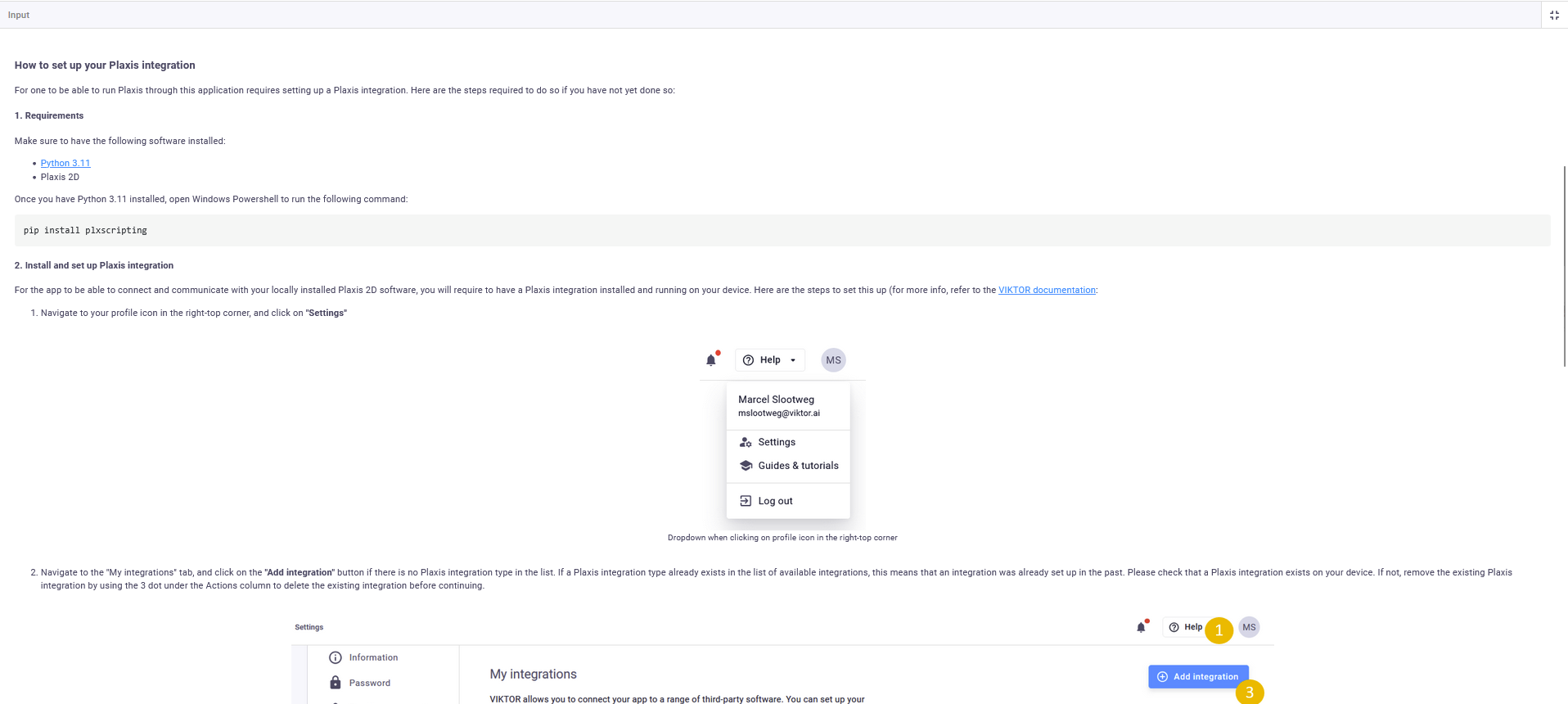
I recently had to help out a couple of engineers with their Plaxis-integrated VIKTOR applications. These apps needed to have the option of allowing users to connect to their Plaxis software on their own machine, i.e. using a Personal Worker.
To inform the user on how to set up a Personal Worker, I created a Markdown Plaxis Setup Manual, and used the MarkdownField to display this. Here is the result:
For those interested in the Plaxis Setup Manual, here you can download it:
plaxis_installation_guide.md (2.6 KB)
And images for assets folder:
assets.zip (323.5 KB)