Description of the limitation and why it is relevant to address
The create_integration_strip(plane, point_1, point_2, width) function currently doesn’t support a name variable.

The IntegrationStrip object (which is created by the create_integration_strip function) however has a name variable available.
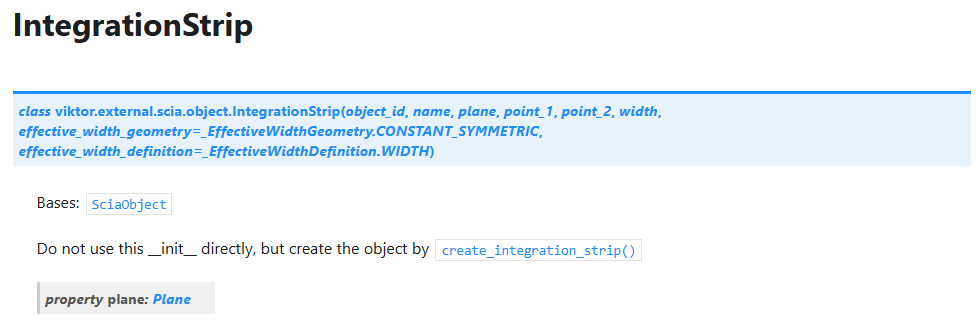
I would like to be able to give names to the integrationstrips so I can postprocess the results much easier. Since the name variable is already in the object it is quite easy to add this to the create function. Changing this name variable changes the object name in SCIA (see workarounds)
Submitter proposed design (optional)
Add name parameter to the create_integration_strip function
Current workarounds
Since the name variable is already present in the IntegrationStrip we can adjust it after creating the object:
# Create the SCIA integration strip
        strip = self.model.create_integration_strip(plane=plane, point_1=point_1, point_2=point_2, width=width)
        # Try to set the name after creation if possible
        if hasattr(strip, '_name'):
            strip._name = f"strip_{plane_name}_{point_1}_{point_2}"
this will change the initial object parameters from:
 - <viktor.external.scia.object.Plane object at 0x000001C6409148F0>: (5.0, 11.0, 0) to (5.0, 1.0, 0), width 1.0
<viktor.external.scia.object.IntegrationStrip object at 0x000001C671ECCB30>
{'_object_id': 1, '_name': 'CM1', '_plane': <viktor.external.scia.object.Plane object at 0x000001C6409148F0>, 'point_1': (5.0, 11.0, 0), 'point_2': (5.0, 1.0, 0), 'width': 1.0, '_effective_width_geometry': <_EffectiveWidthGeometry.CONSTANT_SYMMETRIC: 0>, '_effective_width_definition': <_EffectiveWidthDefinition.WIDTH: 0>}
to
 - <viktor.external.scia.object.Plane object at 0x000002130637CC80>: (5.0, 11.0, 0) to (5.0, 1.0, 0), width 1.0
<viktor.external.scia.object.IntegrationStrip object at 0x000002130637CFE0>
{'_object_id': 1, '_name': 'strip_Z1_1_(5.0, 11.0, 0)_(5.0, 1.0, 0)', '_plane': <viktor.external.scia.object.Plane object at 0x000002130637CC80>, 'point_1': (5.0, 11.0, 0), 'point_2': (5.0, 1.0, 0), 'width': 1.0, '_effective_width_geometry': <_EffectiveWidthGeometry.CONSTANT_SYMMETRIC: 0>, '_effective_width_definition': <_EffectiveWidthDefinition.WIDTH: 0>}
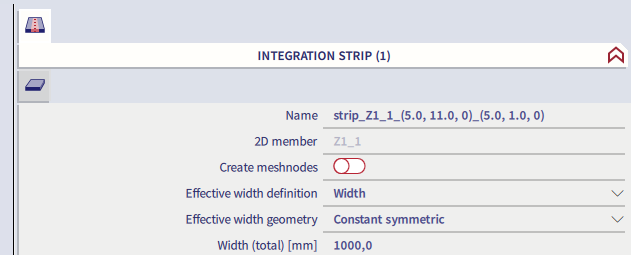
when the model is created this will result in: