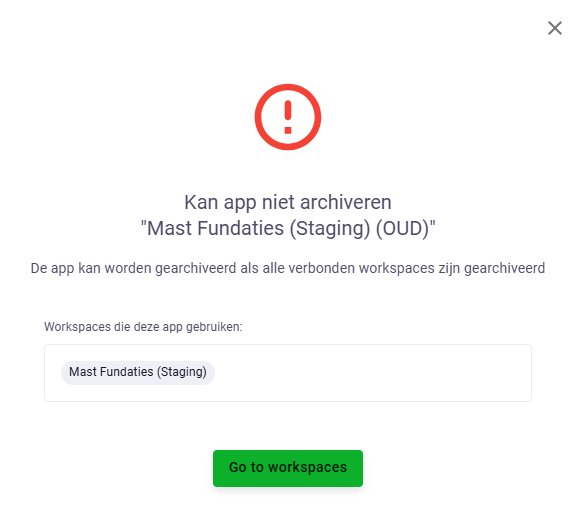
I try to achrive an app. But i cannot find the workspaces where it is being used. (No overview of all workspaces of an app) and the button go to workspaces doesn’t work. It just brings you back to the app.
I had a similar issue just yesterday. What I found is that the workspace was archived within one project. I had to remove (delete) it from the project first.
Yes very annoying indeed. You could try and locate it my right click in your browser, “inspect” the “network” activities, and see what workspace ID it refers to.
Great I would like to add the following suggestion: @tvantil
Projects contain Workspaces of a specific app.
So it would be nice to see:
Overview of all Projects and which Apps are inside each project
Overview of all apps and in which projects they are used.
Specific project and the workspaces it contains (Current project view)
Specific app and the workspaces it has (with obviously the corresponding project)
Extension, but show in these views who created the project and who have “admin or creating rights at project level”.
The current Project overview:
Add filter / sort options for each column.
Have a column with amount of apps (workspaces) inside project with a hover of all names (of the Apps)
Broadcasting actions:
Controle workspace name / description / labels at App Store (app) level. Link them. So if we want to update something, that we do not have to go past each project manually.
Update reading/writing rights of each workspace within each project as if it was a single workspace.
Etc.
Start page:
Expand amout of projects seen (last 25 at least, even if it is only a table.
Have a direct link to Projects, so you do not have to open de sidebar first (or know it exists)
User level
Allow tagging a user with certain labels. Which are linked to the workspaces / apps.
(So example: John Doe (labels = Civil, Maritime, Durability) when opening projects/add apps etc. by default (or by filter) sees only those Projects/Apps (workspaces) with matching labels.
This way it is way easier to find relevant apps. (of course have an option to see all apps etc.)
Another issue is a bit lower level:
Which projects are there and can members add apps to the project (This issue came up silently, user cannot add apps to projects due to default rights)
Which entities within (all) apps have read only rights (issue came up without us knowing on time that an entity was read only, could not be created etc. if you didn’t have the correct rights)
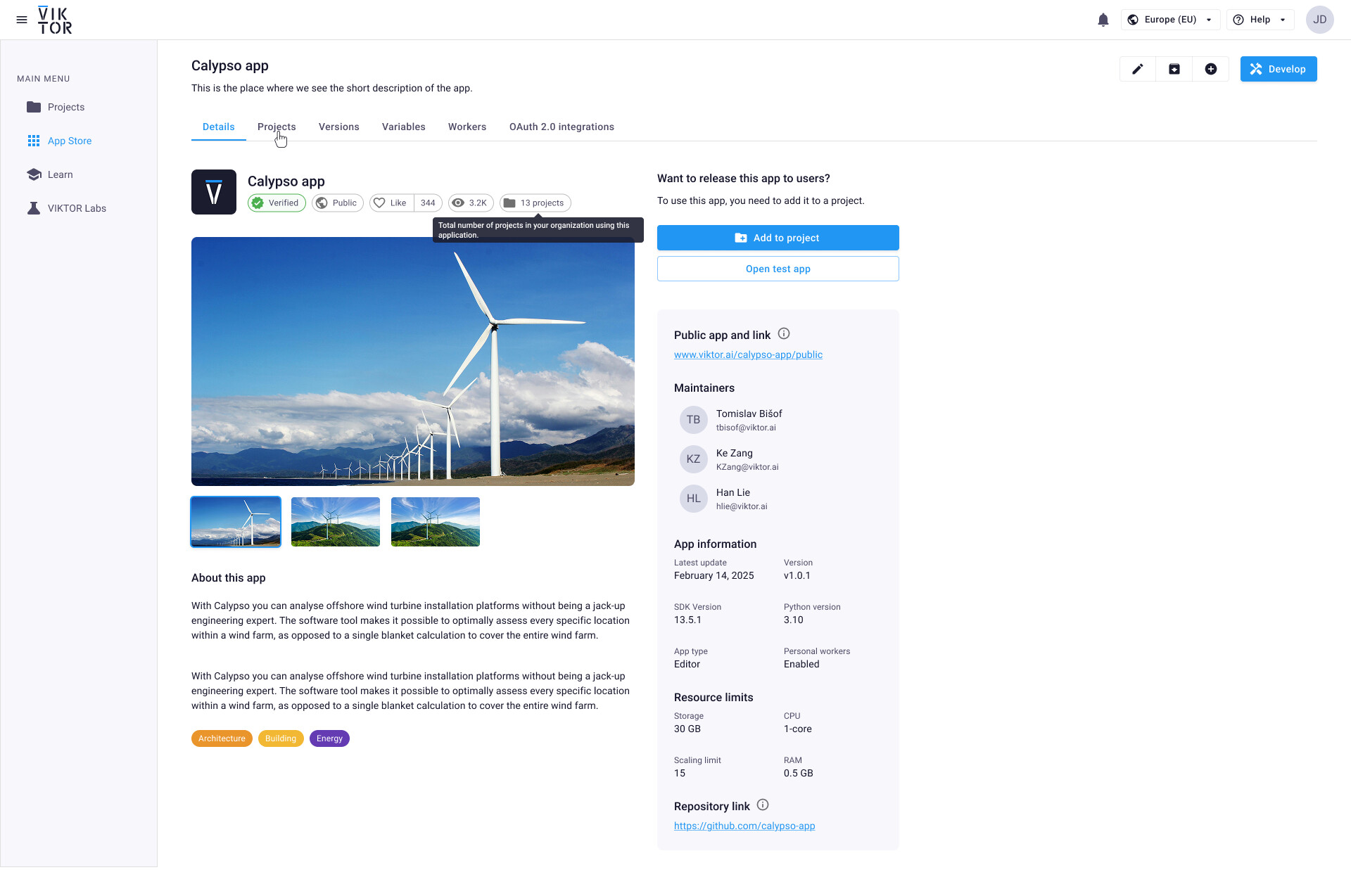
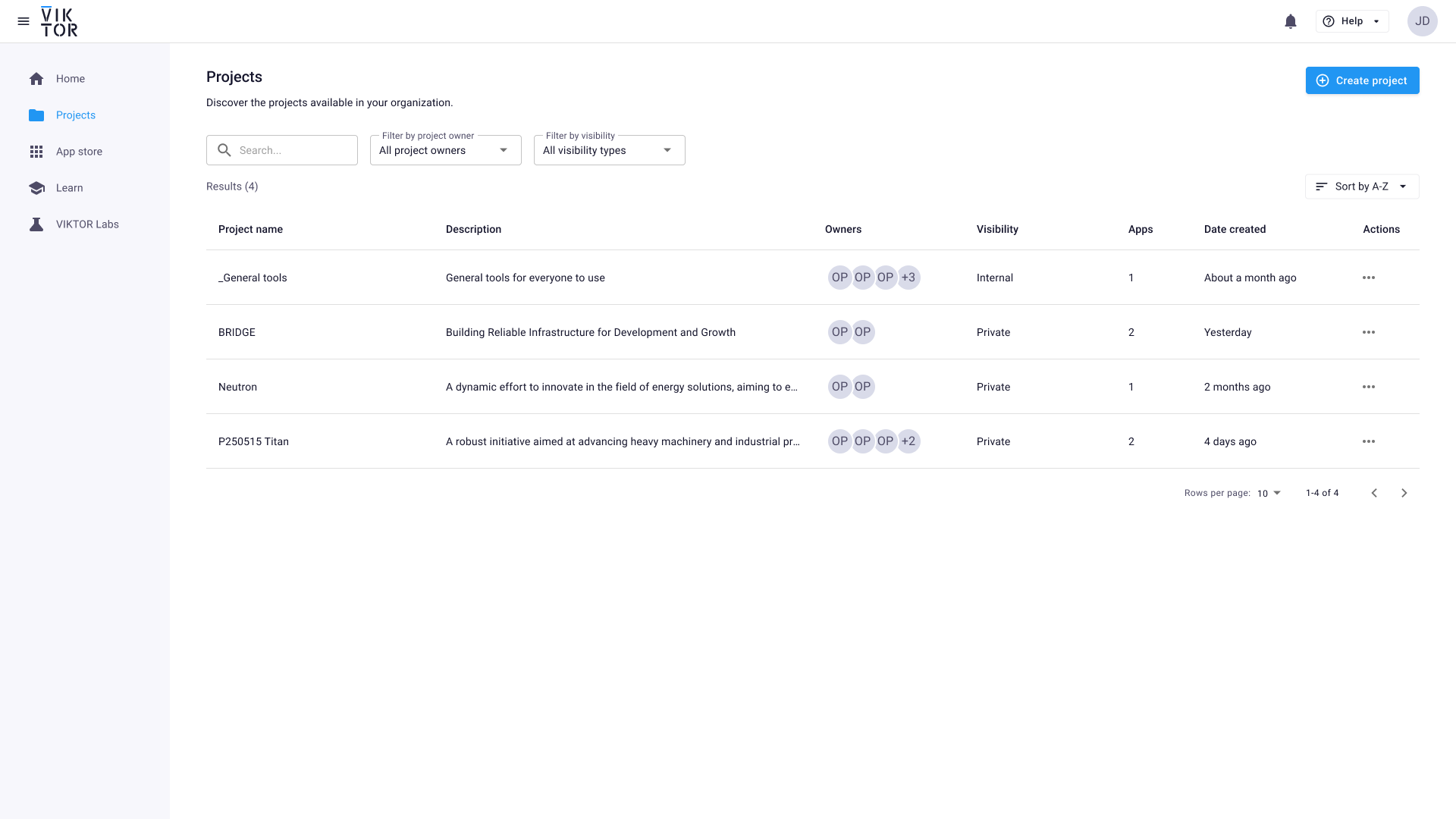
I have designed an improvement on the projects overview table, and also improved the visibility of projects using apps and apps in projects. These 2 new designs address a number of your first points. These two screens show an overview of the new states of projects overview and the app details page of a specific app.
when selecting the apps column, the user will get an overview of the apps that are in the project
Broadcasting options:
This is interesting. Do you mean that if you update the labels on an app that you want this to apply globally to all the workspaces of that app too? Do you ever see a situation where this information could potentially be different and not want to push the changes from app level to specific workspaces?
Start page:
Do you refer to the home page?
Current expansion ideas include recently used apps, my projects (either ones that I own, or ones that I last visited)
The lower level items:
Would there be a case where other users should NOT see certain projects? Or can your users see all projects in the environment?
An idea that I have here is to allow all users to see all projects but ones that they do not have explicit permissions to view, that they could request access.
Doing the above will mean that a project owner/admin will be clearly visible to the user making the request.
What this doesn’t contain is an overview of all of the workspaces of the app
Feedback
This already helps a lot. As only a single workspace of an app cna be present in a project. The number of projects is equivalent to the amount of workspaces. So that is great.
additional columns added (apps, and date created)
ability to sort on these new columns
when selecting the apps column, the user will get an overview of the apps that are in the project
Feedback
Besides sorting, please add a filter option.
It would be really nice to have a “Favorite” star option for Projects for user. So you can filter (boolean) and show these Favorite projects at the home page.
Broadcasting options:
This is interesting. Do you mean that if you update the labels on an app that you want this to apply globally to all the workspaces of that app too? Do you ever see a situation where this information could potentially be different and not want to push the changes from app level to specific workspaces?
Feedback
By default (i would say) a workspace should always be managed at app level. I do not see why you would change this at project level. Lets say we change the description of a workspace (app), we now have to update all workspaces manually. That is not wanted. So visualize certain data from the app in the workspace tile seems most logic to me. (Like link image, name, description etc.)
Start page:
Do you refer to the home page?
Current expansion ideas include recently used apps, my projects (either ones that I own, or ones that I last visited)
Feedback
Yes home page. It now shows the last 3 Workspaces. But instead it would be nice to see either last n projects AND / or the projects saved as favorite by the user.
The lower level items:
Would there be a case where other users should NOT see certain projects? Or can your users see all projects in the environment?
An idea that I have here is to allow all users to see all projects but ones that they do not have explicit permissions to view, that they could request access.
Doing the above will mean that a project owner/admin will be clearly visible to the user making the request.
Feedback
Due to the current setup it is best the user see only a few projects. Otherwise they cannot find their own.
But we want to make internal projects the default (now the first option is private) with the option to create private projects.
It would be nice to:
Allow users to see what private projects there are, but not being able to open them
By default only see projects you have acces to (to avoid information overflow)
Have some sort of filters at app/project level based on a user group a user is added to.
(So lets say i am from Civil + Geo. So all projects/apps with that label will be visible to me when applying my profile filter.)
Hopefully this helps. thanks for the reply so far!
Thanks @mslootweg. Reading through the comments, I agree with most of the points raised - many of which I think we have discussed a few times before. @tvantil, the updated view of which projects are using an app looks really good to me and will be helpful for us!
Re broadcasting: I agree it would be very useful to be able to set the labels on workspaces based on the labels of the app. We often find situations where the labels are out of sync or missing from the workspace (though this has generally improved since the introduction of projects). I believe, a full solution to this would rely on some form a version fixing for workspaces - the labels of the workspace should match those of the app version being used on that project and there are likely situations where you don’t wish to upgrade the app version for old projects.
We use private workspaces as default, which meets our information management processes (only necessary people can access project data). However, giving people a way to discover projects that they should have access to and guiding them to who to contact to get access would be very helpful!
@Johan_Tuls an update on the original post of this thread - we have released a fix to this. You should now be able to go to projects rather than to Workspaces in order to find and archive Workspaces before archiving your app.