Description of the limitation and why it is relevant to address
As a developer I want to have more freedom to arrange input parameters and views so that I can design the best user experience for a given use case.
I think this is relevant for the VIKTOR platform because:
- in a single view you have more information, reducing friction that was there because of clicking
- it makes many apps more user-friendly, where users not always realising that there are more results behind certain tabs.
- this results in less instructions
- less manual iterations if information is divided between views
- enhances decision-making
- and… maybe most importantly… it will make developers happier, knowing there is more flexibility and freedom.
Submitter proposed design (optional)
VIKTOR’s design currently assumes a panel on the left for input parameters and buttons (defined in the Parametrization class), and the right for views (defined in the Controller class). The new design should either consider making the existing panels adjustable/configurable, or to add panels within the existing design (from a definition perspective I prefer the latter).
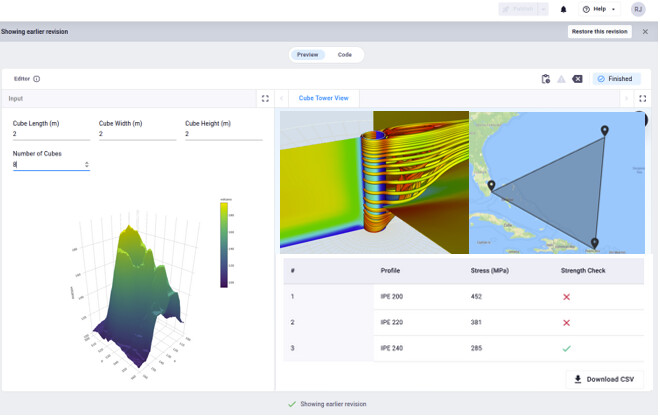
Taking the latter case, an idea would be to have something like a ViewField, where the developer can embed a view on the left-hand side. The right could have something similar, with for example a MultiView decorator, where the user can then configure multiple views as columns and rows, similarly as to how plotting packages handle subplots.
This design solves a lot of the requests that are there related to get more views on one page, but does not yet resolve requests such as have input fields divided in sections that represent columns (multiple panels next to one another) on a page. I leave it up to the comments section for ideas.
Here is an example of how the code could look like:
class Parametrization(vkt.Parametrization):
    length = vkt.NumberField("Cube Length")
    width = vkt.NumberField("Cube width")
    height = vkt.NumberField("Cube Height")
    number_cubes = vkt.NumberField("Number of cubes")
    view_field = vkt.ViewField(view="get_plot_view", flex=100)


class Controller(vkt.Controller):
    parametrization = Parametrization

    def get_plot_view(self, params, **kwargs):
        ...
        return vkt.PlotlyResult(...)

    def get_web_view(self, params, **kwargs):
        ...
        return vkt.WebResult(...)

    def get_map_view(self, params, **kwargs):
        ...
        return vkt.MapResult(...)

    def get_table_view(self, params, **kwargs):
        ...
        return vkt.TableResult(...)

    @vkt.MultiView("Label of Plot")
    def get_multi_view(self, params, **kwargs):
        subview_grid = vkt.MultiViewGrid(rows=2, columns=2, ...)
        subview_grid.add_view(self.get_plot_view(params), row=0, col=0)
        subview_grid.add_view(self.get_map_view(params), row=0, col=1)
        subview_grid.add_view(self.get_table_view(params), row=1, col=[0, 1])
        return vkt.MultiResult(subview_grid)
And the result:
Current workarounds
None
